



Protecta Project Manager recognised at the ASFP Awards 2026
Protecta Project Manager, developed by Polyseam for Protecta customers, has won Passive Fire Digital Product of the Year at the ASFP Awards 2026.
The award recognises standout digital innovation that has made a significant impact on the passive fire protection sector. For Protecta, it is an important acknowledgement of the work invested in creating a practical platform that connects tested firestopping solutions with project planning, installation records, evidence capture and reporting.
Protecta Project Manager was built around a simple principle: passive fire protection must be planned, installed and proven. By bringing the information needed at each stage into one secure platform, the software helps contractors, installers, supervisors, project managers and inspectors manage firestopping work with greater clarity and traceability.
WHY BETTER INFORMATION MANAGEMENT MATTERS IN FIRESTOPPING
On many construction projects, the information needed to verify passive fire protection is spread across drawings, photographs, emails, product documents and separate reports. Even when the installation itself is correct, disconnected records can make inspection, handover and future building management more difficult.
Firestopping is not simply about selecting a product. The complete tested system must be suitable for the wall or floor construction, the service penetration, the opening size, the required fire resistance and the intended installation method. The installed work must then be recorded clearly enough for others to understand what was installed, where it was installed and which evidence supports it.
Protecta Project Manager creates a structured digital workflow around that process. It brings together system selection, project drawings, installation data, photographs, approvals and reports, helping teams build a clear record as work progresses rather than trying to reconstruct it at the end of the project.
ONE PLATFORM TO PLAN, RECORD AND PROVE
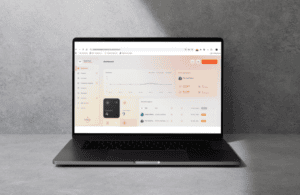
The platform combines project management software for office-based teams with a mobile app designed for real construction-site conditions. Its connected features support the full firestopping workflow.
Create projects and manage floor plans
Users can create projects, upload PDF or image floor plans and organise work by building area or level. Individual firestop installations can be identified using markers placed directly onto the relevant drawing, creating a clear connection between the physical location and its digital record.
Each marker can include the service and penetration details, Protecta products used, fire rating, installation status, installer information, dates, comments and supporting photographs. Statuses such as planned, in progress, installed and inspected provide project teams with a clearer view of progress.
Find tested systems with the integrated Solution Finder
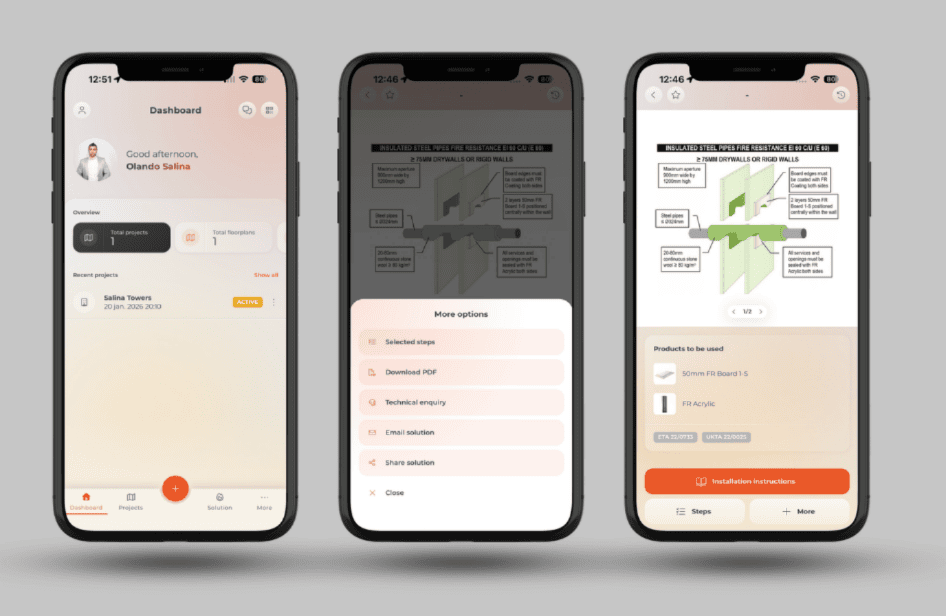
One of the platform’s most important functions is the integrated Protecta Solution Finder. Users are guided through relevant project criteria, including construction type, service type, penetration configuration and required fire classification, to identify matching tested and certified Protecta systems.
Each result can provide installation images, the required product list, ETA or UKTA information, installation instructions and downloadable documentation. Rather than treating system selection as a separate task, users can assign the selected solution directly to a project marker or save it for future use.
This helps teams move from product-led assumptions towards evidence-based system selection. The Solution Finder supports technical decision-making; it does not replace the need to confirm that the selected system matches the actual site conditions and approval scope.
Record installation evidence as work happens
Photographic and installation evidence can be captured against the relevant marker while the work is taking place. Teams can record before-and-after images together with the key information required to identify the installation.
Because the location, selected system, product information and evidence remain connected, project managers and inspectors can review a more complete record without having to search across multiple folders or platforms.
Improve traceability with QR codes
Smart QR code functionality provides a direct link between the physical installation and its digital record. When a QR tag is placed at the installation, authorised users can scan it to access information such as the fire classification, products used, installation images, history and responsible installer.
This can support inspection, maintenance, refurbishment and handover by making relevant information easier to retrieve later in the building lifecycle.
Generate clear reports for compliance and handover
Protecta Project Manager uses the information already recorded in the platform to generate structured firestopping reports. These can include marker data, photographs, linked solutions and installation information, helping teams produce installation reports, solution reports, floor-by-floor summaries and audit trails.
Building the record progressively can reduce the time spent chasing information at the end of a project and provide clients, inspectors and building safety teams with clearer handover documentation.
Collaborate with controlled access
Project teams can invite colleagues, installers, subcontractors and other partners to collaborate with defined access levels. Viewer, installer, supervisor and project manager roles help control who can view, add, manage or delete project information.
Real-time in-app messaging keeps project conversations closer to the relevant work, supporting clearer communication between site and office teams.
Keep working with the Offline Workspace
Construction sites do not always provide reliable connectivity. The Offline Workspace allows users to download floor plans and the latest Solution Finder data before entering an area with limited or no signal.
Users can continue creating markers, linking solutions and recording installation information offline. When connectivity is restored, the changes are automatically synchronised with the project, helping teams maintain productivity and accurate records in basements, plant rooms and other challenging locations.
Store project information securely
Project data is stored in the cloud using industry-standard security and encryption. This gives authorised team members access to current project information while helping protect the records needed for ongoing management, inspection and handover.
SUPPORTING THE GOLDEN THREAD OF BUILDING SAFETY INFORMATION
The Golden Thread requires reliable building information to be created, maintained and available to the people who need it. For passive fire protection, that means retaining more than the name of a product. The record should connect the installed system with its precise location, supporting evidence and installation history.
Protecta Project Manager supports this approach by linking:
- floor plan locations and installation markers
- tested Protecta systems and product information
- fire classifications and installation details
- photographs, comments, dates and responsible users
- inspection status, reports and handover records
Together, these functions create a stronger digital audit trail across the project lifecycle. They help teams demonstrate how a firestopping decision was made and what was installed, while giving future stakeholders a clearer evidence base for inspection, maintenance or alteration.
WHAT THE ASFP AWARD MEANS TO PROTECTA
Winning Passive Fire Digital Product of the Year is recognition not only of the technology, but of the practical problem the platform is designed to solve.
Protecta has long supported customers with tested firestopping systems, technical documentation, training and project-specific advice. Protecta Project Manager extends that support into the way projects are planned and recorded. It helps connect the tested system selected at the start with the evidence needed to verify the completed installation.
The award also reflects the contribution of the Polyseam team, development partners and customers whose feedback has helped shape the platform around real site requirements. Development will continue as workflows, reporting and project controls evolve
WHO IS PROTECTA PROJECT MANAGER FOR?
The platform is designed for organisations and individuals involved in specifying, installing, managing or inspecting passive fire protection, including:
- firestopping contractors and installers
- supervisors and project managers
- passive fire inspectors and compliance teams
- main contractors and building safety managers
- Protecta customers who need structured project and handover records
Whether the priority is finding an appropriate tested system, recording installations more consistently or producing clearer reports, the platform provides one connected place to manage the process.
START USING PROTECTA PROJECT MANAGER
Protecta Project Manager is available free of charge to Protecta customers. Visit the Protecta Project Manager page to learn more, register for access and see how the platform can help your team plan projects, record installations and prove what has been installed.
Protecta Project Manager. Plan. Record. Prove.
FREQUENTLY ASKED QUESTIONS
What is Protecta Project Manager?
Protecta Project Manager is passive fire protection project management software that combines system selection, floor plans, installation records, photographs, team collaboration and reporting in one platform.
Can the app be used without an internet connection?
Yes. The Offline Workspace allows users to download selected floor plans and Solution Finder data, record installation information offline and synchronise changes when connectivity returns.
How does the app support firestopping compliance?
The app helps users select tested Protecta systems, connect them to specific installation locations, capture supporting evidence and generate structured reports. It supports a more traceable compliance process but does not replace technical assessment, competent installation or inspection.
Is Protecta Project Manager free?
Protecta Project Manager is available free of charge to Protecta customers. Registration and further information are available on the Protecta website.
Products developed and manufactured by Polyseam Ltd.

